Raspberry Pi RTC(DS-1307) 연동
목차
1. Raspbian-stretch 다운로드
2. I2C Setting
3. I2C-Tool 설치
4. Device 확인
5. RTC Device 설치
6. RTC 시간 설정
7. RTC 자동 동기화 설정
#개발환경
-라즈베리파이3 Model B
-raspbian-stretch(2018-10-09

1. Raspbian-stretch 다운로드
http://downloads.raspberrypi.org/raspbian/images/raspbian-2018-10-11/
Index of /raspbian/images/raspbian-2018-10-11
downloads.raspberrypi.org

2. I2C Setting
~$ su (root 로그인)

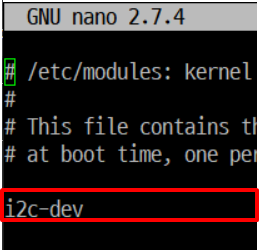
~$ sudo nano /etc/modules 에
I2c-dev 를 추가
3. I2C 활성화
~$ sudo raspi-config

-> ⑤.Interfacing Option

->P5 I2C

-> <Yes>
~$ sudo reboot
4. I2C-Tool 설치
~$ sudo apt-get install i2c-tools
5. Device 확인
~$ sudo i2cdetect -y 1
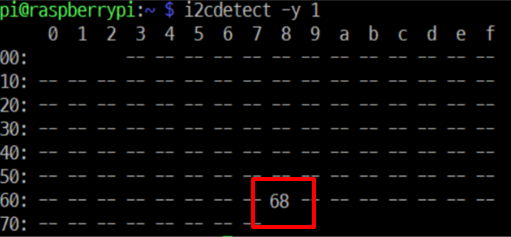
Address 68번에 데이터 확인
6. RTC Device 설치
~$ sudo modprobe rtc-ds1307
~$ echo 'ds1307 0x68' | sudo tee /sys/class/i2c-adapter/i2c-1/new_device
7. RTC 시간 설정
~$sudo raspi-config

④ Localisation Options
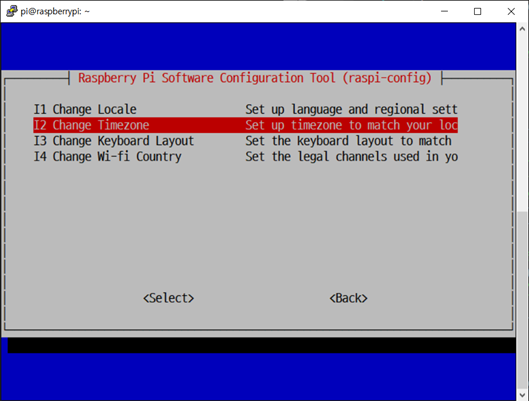
I2 Change Timezone

Asia

Seoul
~$ hwclock -w (시간 설정)
8. RTC 자동 동기화 설정
~$ sudo nano /etc/rc.local

exit 0 위에 다음과 같은 코드 입력
echo ds1307 0x68 > /sys/class/i2c-adapter/i2c-1/new_device &
hwclock -s &
~$ sudo reboot
~$ sudo hwclock -r
위 명령어로 시간 확인가능

END…
'Raspbegrry Pi > Model 3B' 카테고리의 다른 글
| Raspberry3B SD카드 3B+에서 부팅 안될때 (0) | 2021.07.16 |
|---|---|
| Embedded platform 초기 설정 (0) | 2020.11.24 |
| RaspberryPi3 ModelB + Qt5.6.2 Cross Compile (0) | 2020.11.24 |

